
GPS Logger for Android - Get APK
You'll be able to download in few seconds.
Publisher Description
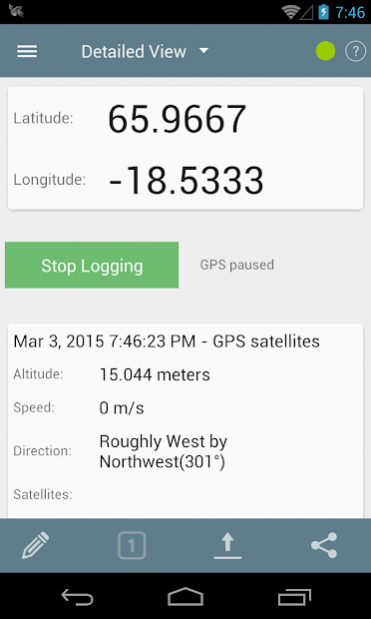

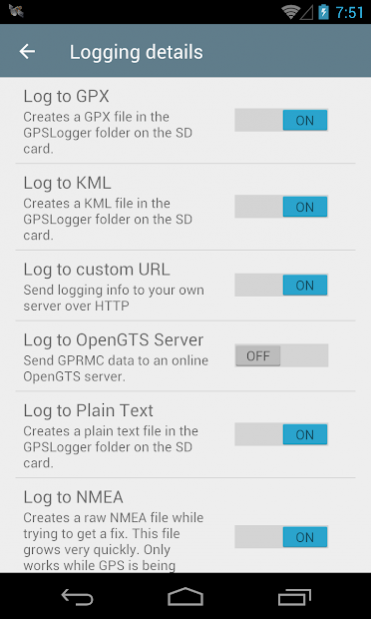
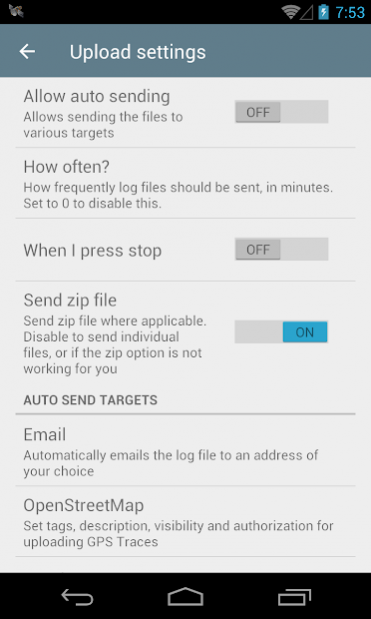
A lightweight, battery efficient GPS Logger. The purpose of this app is to log your GPS coordinates at specified intervals to a file on your SD card. This app runs in the background so that you can on a long walk, hike, flight ride or photo session or even go buy some milk and have this running as long as possible. Once you're back at your computer, you can then use the files to geotag photos, upload to travel sites, view in Google Earth and so on.
***Features:
* Specify time intervals
* Specify distance intervals
* Cell phone tower or GPS satellites
* Log to GPX, KML, CSV or NMEA files
* Log to a Custom URL
* Shows a notification
* Imperial display units
* Auto start on boot
* Auto send to email/FTP/DropBox/Google Docs/OpenStreetMap/OpenGTS at intervals
* OpenStreetMap - upload GPS traces
* Dropbox - upload GPX/KML/ZIP/TXT
* Google Docs - upload GPX/KML/ZIP/TXT
* OpenGTS - auto send or upload points
Bugs, feature requests, questions - please submit them to github.com/mendhak/gpslogger (issue tracker).
Translations - submit to http://crowdin.net/project/gpslogger-for-android/invite
***Notes:
A data connection is used by this app only if you use auto-email or OpenStreetMap or Dropbox features.
Although the app allows 0 second frequencies, it is not recommended as the recording and logging is happening very fast; this could cause instability/hangs. Try 1-3 seconds instead.
If there's a feature that you feel the app should have, you can submit a feature request on the github site.
***Explanation of permissions:
Storage - reading and writing files to the GPSLogger folder on your SD card
Network communication - used when uploading the files (Dropbox, Openstreetmap) or sending emails or authorizing you with Dropbox, Openstreetmap
Your location - used to determine your GPS or tower based location
System tools (automatically start at boot) - used if you choose to start GPSLogger on bootup
Activity recognition - to recognize when phone is still and to pause logging
***Credits
Most icons kindly provided by icons8.com
*** Privacy Policy
https://github.com/mendhak/gpslogger/blob/master/assets/text/privacypolicy.md#privacy-policy
About GPS Logger for Android
The company that develops GPS Logger for Android is Mendhak. The latest version released by its developer is 1.0 .
To install GPS Logger for Android on your Android device, just click the green Continue To App button above to start the installation process. The app is listed on our website since 2020-03-02 and was downloaded 0 times. We have already checked if the download link is safe, however for your own protection we recommend that you scan the downloaded app with your antivirus. Your antivirus may detect the GPS Logger for Android as malware as malware if the download link to com.mendhak.gpslogger is broken.
How to install GPS Logger for Android on your Android device:
- Click on the Continue To App button on our website. This will redirect you to Google Play.
- Once the GPS Logger for Android is shown in the Google Play listing of your Android device, you can start its download and installation. Tap on the Install button located below the search bar and to the right of the app icon.
- A pop-up window with the permissions required by GPS Logger for Android will be shown. Click on Accept to continue the process.
- GPS Logger for Android will be downloaded onto your device, displaying a progress. Once the download completes, the installation will start and you'll get a notification after the installation is finished.
Program Details
System requirements
Download information
Pricing
Version History
version
posted on 2020-03-02
Allowing non-https Custom URLs on Android 8+
Fix for GPS Week Number Rollover problem (if you're seeing year 2000 log entries, you have old hardware and this should fix those timestamps)
Once a month logging option
Retrieve Android ID instead of Serial Number on Android 8+
Fix for success dialog spam on customurl screen
Updated translations from crowdin
version
posted on 2019-07-21
You can now load a profile from a URL (download link or click link) see https://gpslogger.app/#whatareprofiles for instructions.
Autosuggest for custom file name and annotations (the last 10 entries are remembered)
Increased Custom URL retry count to 5
Removed default Custom URL header in preferences screen to avoid confusion
Accuracy filter will now apply to annotations
version
posted on 2018-01-11
Custom URL screen allows custom body, header, method - if you used 'POST' before you will need to re-enter the body.
Lowered memory usage with some minor optimisations
Updated translations including Tagalog - thanks crowdin folks as always
Fixed a few reported ANRs from Google Developer Console
Fixed ANR when startLogging called without permissions being granted
version
posted on 2016-07-31
v79:,CSV also logs HDOP, PDOP, VDOP, dgpsid, ageofdgps, geoid height,Updated translations,v78:,Option to disable changing custom file name dynamically,Added time display to timestamp on detailed screen,Ability to add profile name to custom file name,Moved custom URL from dialog to its own screen
version 1.0.9
posted on 2011-04-30
Several fixes and updates
Disclaimer
External Download
We do not host GPS Logger for Android on our servers. We did not scan it for viruses, adware, spyware or other type of malware. This app is hosted by Galad and passed their terms and conditions to be listed there. We recommend caution when installing it.
The APK Download link for GPS Logger for Android is provided to you by apps112.com without any warranties, representations or guarantees of any kind, so access it at your own risk.
If you have questions regarding this particular app contact the publisher directly. For questions about the functionalities of apps112.com contact us.
